
Internal Office Mail
Give employees an internal company inbox for direct and department messages, with controlled attachments and personal read status.
Explore module →Source present · live validation pending In development
Connect people, orders, stock, finance and field teams, with a growing trade workflow for imports, exports, shipments and country-specific setup.
In development · Explore the agreed product scope and design direction.
 Connected business workflow · Product illustration
CNC finance, private Office Mail, manager approvals and operational incident response now have detailed source-based explanations.
Give employees an internal company inbox for direct and department messages, with controlled attachments and personal read status.
Explore module →Source present · live validation pending
Organize company chat in member-controlled threads, with incremental message polling and personal read cursors.
Explore module →Source present · live validation pending
Control the lifecycle of Office Mail attachments through private storage, retention review, legal holds and company storage limits.
Explore module →Source present · live validation pending
Turn recovery-download security events into reviewed incidents, assigned department responses and independent manager decisions.
Explore module →Source present · live validation pending
Monitor overdue approvals, scheduled-job health and assigned operational incidents, then track resolution review and department accountability.
Explore module →Source present · live validation pending
Show the responsibilities and checks around backup creation, restore approval and recovery testing.
Explore module →Source present · live validation pendingSource changes are documented through Task 84. Live rollout and integration checks remain separate.
A booked order has a route, an owner and a next step.
Capture the customer order and submit it for the configured review.
Order Booker / SalesCheck assigned customer exposure; proceed, hold or route an exception under company credit policy. An order-booker sees status only.
CNC / Authorized Credit ApproverApprove, reject or return the order for rework according to company policy.
Assigned ApproverReserve the stock for the approved order.
WarehousePrepare the dispatch and record the transport handoff.
Warehouse AdminAssign the delivery to an individual driver or rider.
Transport AdminSubmit the delivery outcome and required evidence or exception for authorized review.
Driver / Rider + ReviewerReview the business and delivery handoff for the authorized accounting action.
Accounts Department
Show how a customer order moves from the sales team into approval and fulfilment.
Explore module →Supplied map: Developed
Connect approved orders with stock reservation, warehouse preparation and a traceable dispatch handoff.
Explore module →Supplied map: Partial
Make the movement from warehouse dispatch to individual driver or rider assignment understandable.
Explore module →In development
Bring the financial handoff into view, linking approved purchases, reviewed deliveries and payroll information with authorized accounting work.
Explore module →Supplied map: Partial (Integration Pending)
Organize employee information and connect HR work with attendance, leave, payroll and employee self-service.
Explore module →Supplied map: Developed
Explain every pay-run stage clearly, from preparation and approval to publication and confirmed payment status.
Explore module →Supplied map: DevelopedFieldPro distinguishes platform administration from company operations, department responsibilities and individual driver or employee accounts.
Understand the role structure →The Branch Manager and Supervisor coordinate assigned work across HR, CNC (Credit & Collection), Accounts, Warehouse, Transport, sales, order booking and delivery.
Branch access follows assigned rights. Sensitive HR information, approvals and records from other branches remain permission-controlled.
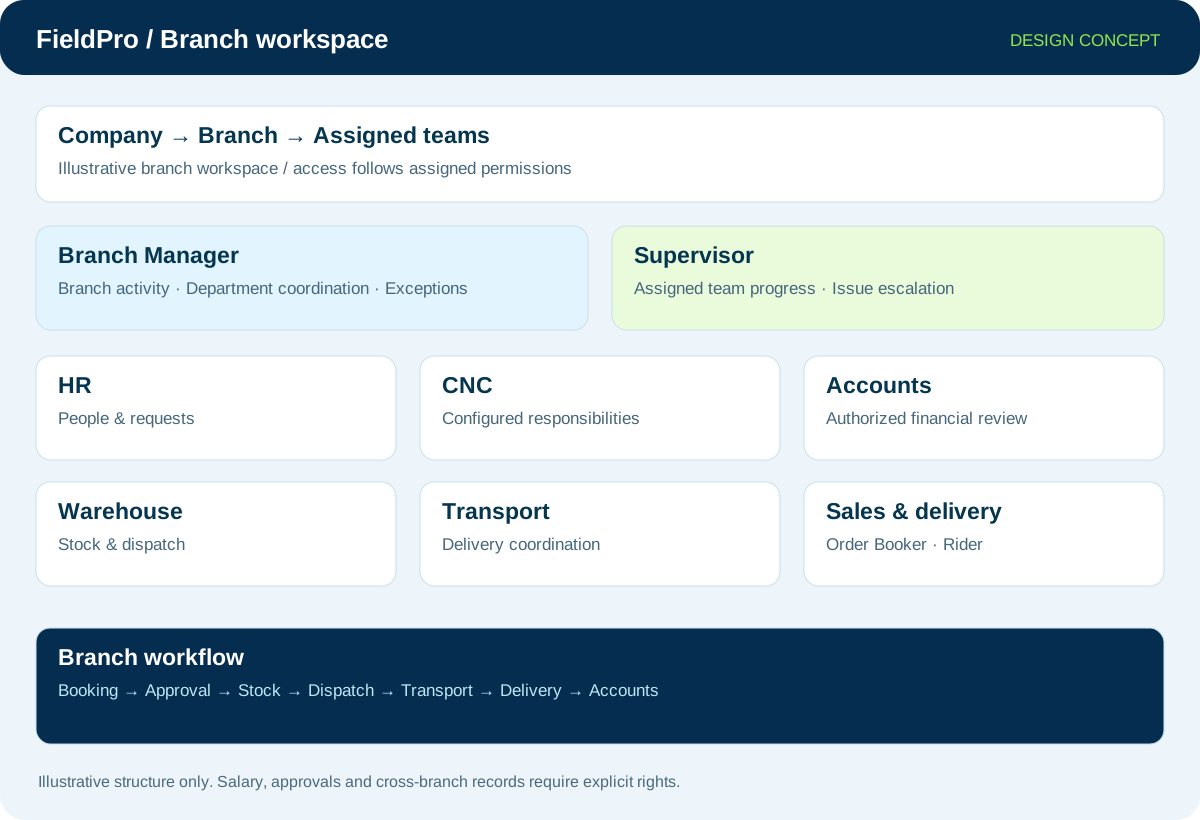
Platform and company administration, branch teams, departments and individual accounts—in one clear directory.

Platform provisioning and authorized support administration.
View application purpose →Application release pending
Company setup, delegated rights and business-wide oversight.
View application purpose →Application release pending
Office administration and assigned company or branch services.
View application purpose →Application release pending
A dedicated entry point for the assigned branch: teams, departmental handoffs and operational summaries.
View application purpose →Application release pendingCoordinate branch operations, assigned supervisors and exceptions within delegated rights.
View application purpose →Application release pendingReview assigned team progress and raise operational issues with the responsible department.
View application purpose →Application release pendingEmployee records, requests and the controlled payroll connection.
View application purpose →Application release pending
Assigned credit accounts, invoice collection cases, follow-up timelines and payment submissions for Accounts review.
View application purpose →Application release pendingReview authorized financial records and delivery-to-accounts handoffs.
View application purpose →Application release pendingManage assigned stock reservations and warehouse dispatch handoffs.
View application purpose →Application release pendingCoordinate dispatch, delivery assignments and operational exceptions.
View application purpose →Application release pending
Support configured region, branch and sales-team responsibilities.
View application purpose →Application release pendingRecord assigned orders and follow their authorized approval and fulfilment progress.
View application purpose →Application release pending
View assigned deliveries and submit delivery evidence or exceptions.
View application purpose →Application release pendingAccess own requests, employee information and published payslips.
View application purpose →Application release pending
Assigned support tickets, assets and approved assistance responsibilities.
View application purpose →Application release pendingApplication names and intended responsibilities are shown above. Live files and verified application links will be added when supplied.

Bring support requests, IT assets and authorized remote assistance into a clear departmental workflow.
Explore module →Integration-dependent
Keep employee communication relevant through company, department and personal channels.
Explore module →Integration-dependent
Make approval ownership explicit, including sequential reviews, escalation and reject/rework paths.
Explore module →Source workflows added · broader automation plannedExplore imports, exports, country tariff context, shipment tracking, trade finance and landed costs.

Coordinate international trade from counterparties and contracts through country documents, customs, shipments and finance handoffs.
Explore module →Supplied map: Foundation (Phase 85)
Organize versioned product classification and country tariff context for reviewed duty estimates and shipment records.
Explore module →Supplied map: Foundation (Phase 85)
Plan shipments and container bookings, with provider-dependent vessel positions, carrier events, ETA and delivery history.
Explore module →Supplied map: Planned
Connect LC, documentary collection, guarantees, advances and remittances to controlled Accounts handoffs.
Explore module →Supplied map: Planned
Bring product value, freight, insurance, handling, duties and currency inputs into reviewed item cost allocations.
Explore module →Supplied map: Planned
Track cargo damage, quantity discrepancies, insurance/supplier/carrier claims and authorized return or re-export handoffs.
Explore module →Supplied map: PlannedCommunication, emergency coordination, company email and separate company branding—with clear feature status.

Give authorized field teams company-scoped communication channels, transmit permissions and a controlled turn to speak.
Explore module →In development
Record company incidents, route them to authorized supervisors and track response, muster and escalation from one dashboard.
Explore module →In development
Manage company mail domains, mailbox requests and provider-confirmed status through an authorized Company Email dashboard.
Explore module →Integration-dependent
Let the Customer Super Admin manage each company identity separately: logo, business name, contacts and company-specific email setup.
Explore module →Planned expansionThe planned expansion includes employee self-service, projects, resource booking, training, signatures, executive reporting and more.
The website explains the product being developed. Design concepts, planned integrations and release validation are identified so you can assess the fit for your business.
Read the product FAQ →Explore the departments and handoffs that match your operation, then prepare a product enquiry around your company structure.